The Code That Steals Your Account: Anatomy of a Microsoft Device-Code Phishing Attack
A real-world walkthrough of a fake “shared document” that never asks for your password — and still takes over your account, straight past multi-factor authentication.
Disclaimer. This is a defensive security writeup published for education and awareness only. All indicators are defanged and no live malware or harvester code is included; victim-identifying details have been redacted — do not re-fang or use anything here for unauthorized or unlawful activity. It is provided “as is,” without warranty. The compromised website referenced was an innocent, hacked third party, not the attacker. Views are the author’s own and do not represent any employer. See the source repository for the full disclaimer and CC BY 4.0 license.
Introduction
For two decades, security training has taught users to distrust the obvious: the misspelled login page, the password box on a domain that isn’t quite right, the surprise attachment. Attackers adapted. One of the most effective account-takeover techniques in circulation today defeats that training completely — because it never shows you a fake login form and never asks for your password.
Instead, it asks you to do something that feels harmless and even reassuring: open the real Microsoft sign-in page and type in a short code. That single action hands the attacker a fully authenticated session to your Microsoft 365 account — and because you completed the genuine login, your multi-factor authentication (MFA) approves it for them.
This article dissects one such campaign, investigated from a live link a user reported in June 2026. It is a textbook example of device-code phishing (also called device-code or OAuth device-authorization phishing) — a technique that has driven a wave of M365 account compromises across hundreds of organizations.
What makes it worth studying is not exotic malware. There is none. The whole attack is a chain of small, individually-plausible steps that, combined, walk past spam filters, link blocklists, fake-login detectors, and MFA. The last line of defense is an informed human who knows the one rule that breaks the chain.
The 30-second version
A user received a link to “view a shared document.” It sat on a real but hacked website, behind a fake “verify you’re human” check. After the check, a convincing Microsoft OneDrive page appeared showing a short verification code and a “Continue to Microsoft” button. The button opened the genuine Microsoft sign-in page and instructed the user to enter that code. Doing so didn’t log the user in to view a document — it authorized the attacker’s computer to sign in as the user. The user even passed their own MFA prompt, so Microsoft saw a perfectly legitimate login and issued the attacker a session that can outlive a password reset.
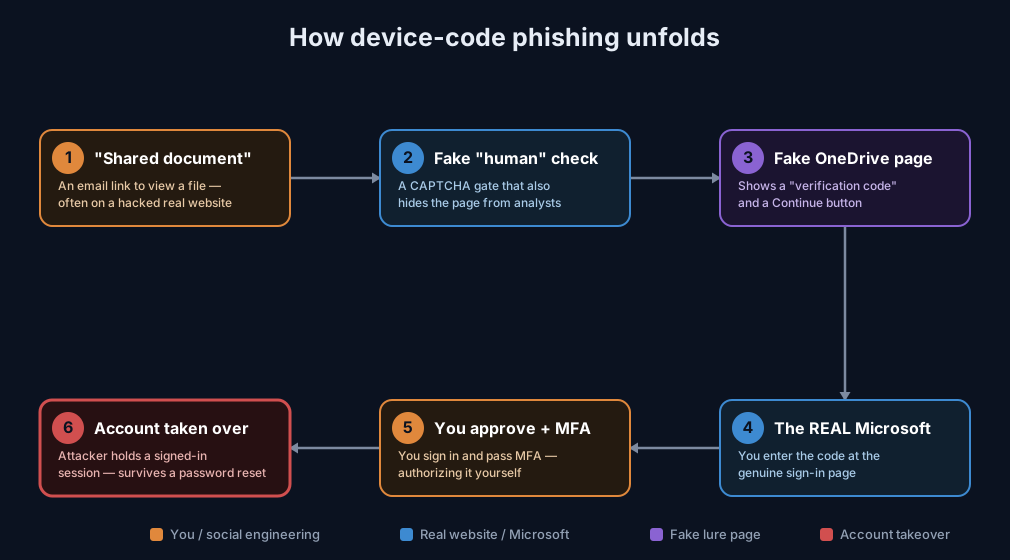
(If the diagram above doesn’t render in your platform, open attack-path.svg from this folder.)
Background: what is the “device code” flow, and why abuse it?
Microsoft (like Google, GitHub, and others) supports an OAuth feature called the Device Authorization Grant. It exists for devices that can’t show a convenient browser — smart TVs, CLI tools, printers, conference-room displays. The flow is:
- The device asks Microsoft to start a login and receives a short user code (e.g.
DPJQSDJDF). - The device tells the human: “On your phone or PC, go to
microsoft.com/deviceloginand enter this code.” - The human enters the code on the real Microsoft page and signs in normally (including MFA).
- Microsoft then issues access and refresh tokens to the device that started the flow.
It’s a genuinely useful feature. The phishing attack simply puts the attacker’s server in the role of “the device.” The victim is tricked into completing steps 2–3 on the attacker’s behalf, and in step 4 Microsoft delivers the keys to the wrong party. Crucially, no password is ever phished and MFA is satisfied by the real user — which is exactly why traditional anti-phishing controls miss it.
Stage 0 — The entry point: a “shared document” on a hacked site
The campaign began with a link of the form:
hxxps://indecodesign[.]net/<folder>/<name>opendocaccess.htmlindecodesign.net is not an attacker domain. It is a legitimate website, registered in 2013 and running on ordinary shared hosting, that was compromised. The attacker simply dropped phishing pages into subfolders. This is the norm for modern campaigns: a link from a known-good domain passes reputation filters, and the real owner often has no idea.
Lesson: A link living on a familiar or legitimate-looking website is not evidence of safety. Compromised sites are the preferred delivery channel precisely because they look clean.
We found several pages from the same kit on the host (filenames all ending …opendocaccess.html) — a templated, multi-target operation.
Stage 1 — The “are you human?” gate (that’s really an analyst trap)
The first page isn’t the lure. It’s a gate: a slick “🔐 Automation Protection Active” box that shows a short text code and asks you to type it. It looks like a routine anti-bot check. It does two jobs for the attacker:
- It filters out automated analysis. Security tools and sandboxes can’t easily solve the visual challenge, so they never see the next stage.
- It fingerprints the visitor. The page quietly calls an IP-lookup service and, if your network belongs to certain hosting/VPN providers commonly used by researchers, it redirects you to Yahoo instead of continuing. A real victim on a corporate or home connection sails through; an investigator gets a harmless decoy.
Only a human on a “normal” connection who solves the code is allowed forward.
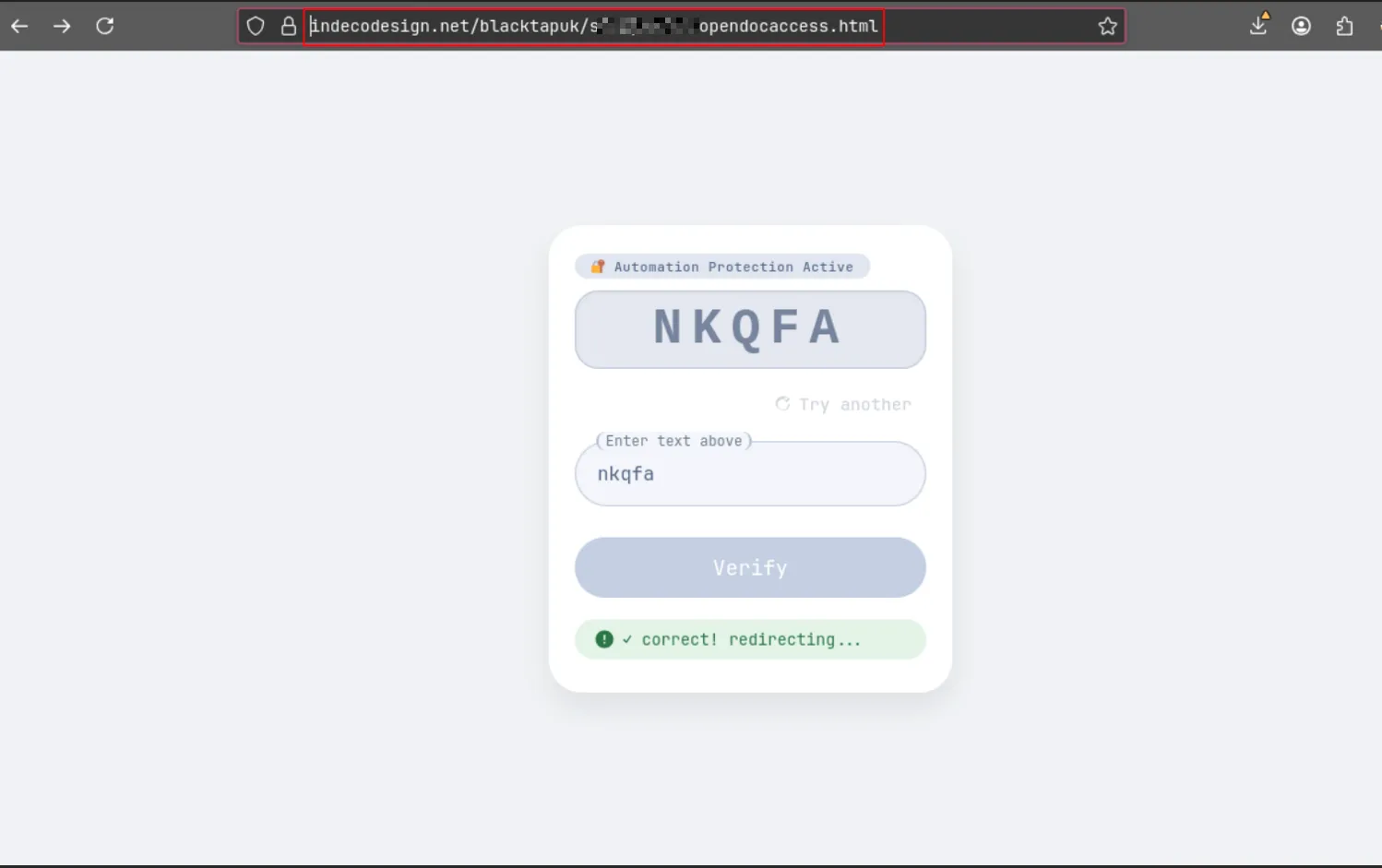
The Stage 1 gate, live. The address bar shows the compromised legitimate host (indecodesign.net/<target>/…). The “🔐 Automation Protection Active” text-CAPTCHA is purely client-side — it exists to stop automated scanners and to fingerprint the visitor’s network, not to protect anyone. Solve it and the page reports “✓ correct! redirecting…” and forwards to the next stage.
Stage 2 — Laundering the link through a trusted site
When the code is solved, the page doesn’t jump straight to the malicious site. It bounces through an open redirect on a legitimate, well-known news website:
hxxps://www[.]the********ker[.]com/articlesfront/banner_click?url=<malicious site>An “open redirect” is a page that will forward a visitor to any address handed to it in the URL. Attackers abuse them to launder their links: the click appears to go to a trusted domain, so URL-reputation filters that trust that domain let it through. We confirmed the redirect was live and would forward to any destination.
Stage 3 — The harvester: a hidden, self-defending OneDrive lure
The final page is hosted on Cloudflare Workers (a free, instant, throwaway hosting platform with valid HTTPS — attractive for the same reasons it’s useful to developers). Two layers of self-defense make it hard to analyze:
- The page is encrypted. What’s actually served is an unreadable blob plus a tiny script that decrypts it inside your browser. Tools that scan the raw page see only ciphertext — there’s nothing obviously malicious to flag.
- It fights inspection. Once decrypted, an injected script disables right-click and the developer-tools shortcuts, runs an anti-debugging trap that wipes the page if a developer console opens, and silences logging.
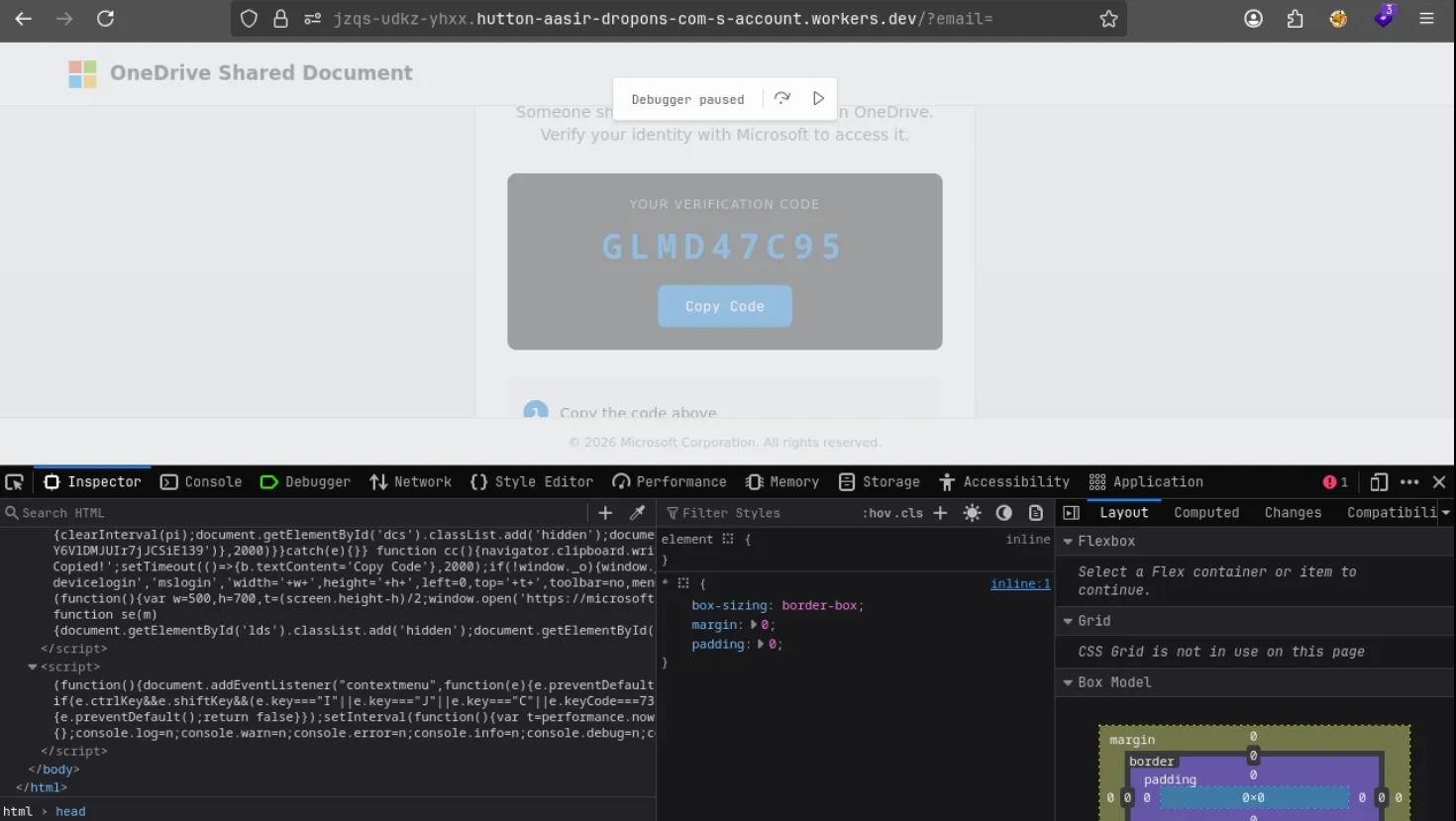
The self-defense in action. Opening browser developer tools trips a debugger trap — execution freezes (“Debugger paused”) and the lure greys out — while the decrypted source in the lower panel reveals the handlers that block right-click and the F12 / Ctrl+Shift+I shortcuts and the code that opens the genuine Microsoft device-login pop-up.
Decrypted, the page is a polished Microsoft OneDrive “Shared Document” screen: a Microsoft logo, a file named Confidential_Memo.docx, the text “Someone shared a document with you on OneDrive. Verify your identity with Microsoft to access it,” a verification code, and a Continue to Microsoft button.
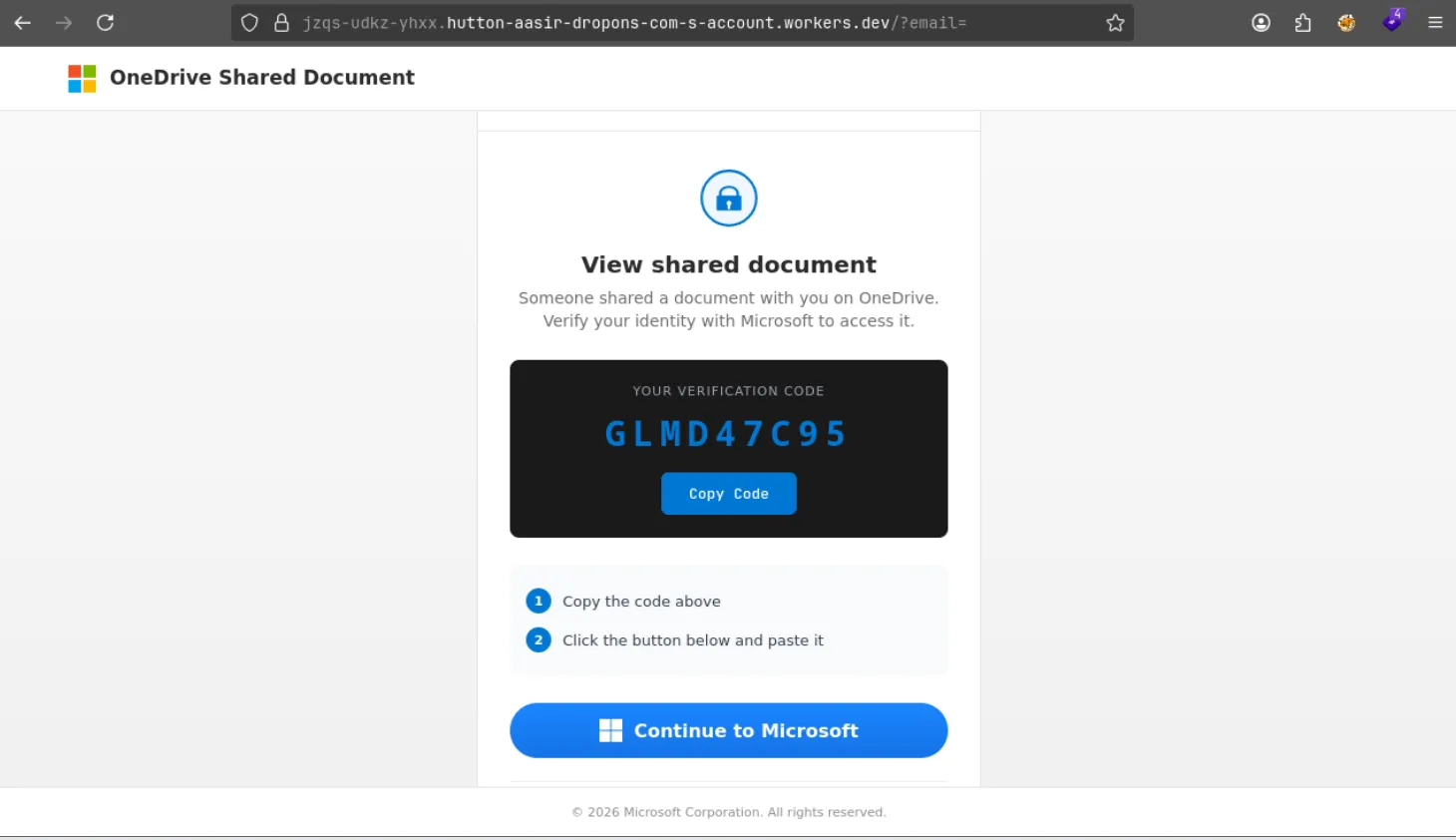
The Stage 3 lure, live. The address bar shows the throwaway Cloudflare Workers host (…workers.dev) — not Microsoft. Note the everyday framing: a shared Confidential_Memo.docx, a “verification code,” and a “Continue to Microsoft” button. The code shown (GLMD47C95) is a real Microsoft device code the attacker’s server requested moments earlier — not a document password. Watch it reappear on the genuine Microsoft page in Stage 4.
Stage 4 — The theft: you authorize the attacker yourself
Behind the scenes, when the lure loads, it calls the attacker’s server, which starts a real Microsoft device-code login and gets back a genuine user code. That code is what’s displayed to you. The page then tells you to copy it and click Continue to Microsoft, which opens the authentic microsoft.com/devicelogin page.
You’re now on the real Microsoft site, with a real padlock and a real address (login.microsoftonline.com/common/oauth2/deviceauth). And here is the moment that matters: the genuine page tells you exactly what is about to happen, if you read it. Its heading is “Enter code to allow access,” its body says “Once you enter the code displayed on your app or device, it will have access to your account,” and — in bold — it warns:
“Do not enter codes from sources you don’t trust.”
Two tells are right there in Microsoft’s own words: this screen is about granting something access to your account, not opening a document; and Microsoft is explicitly cautioning against entering a code you were handed. The attack depends on the victim reading past both. If you only meant to view a shared file, nothing should be asking to allow access to your account — that mismatch is the moment to stop.
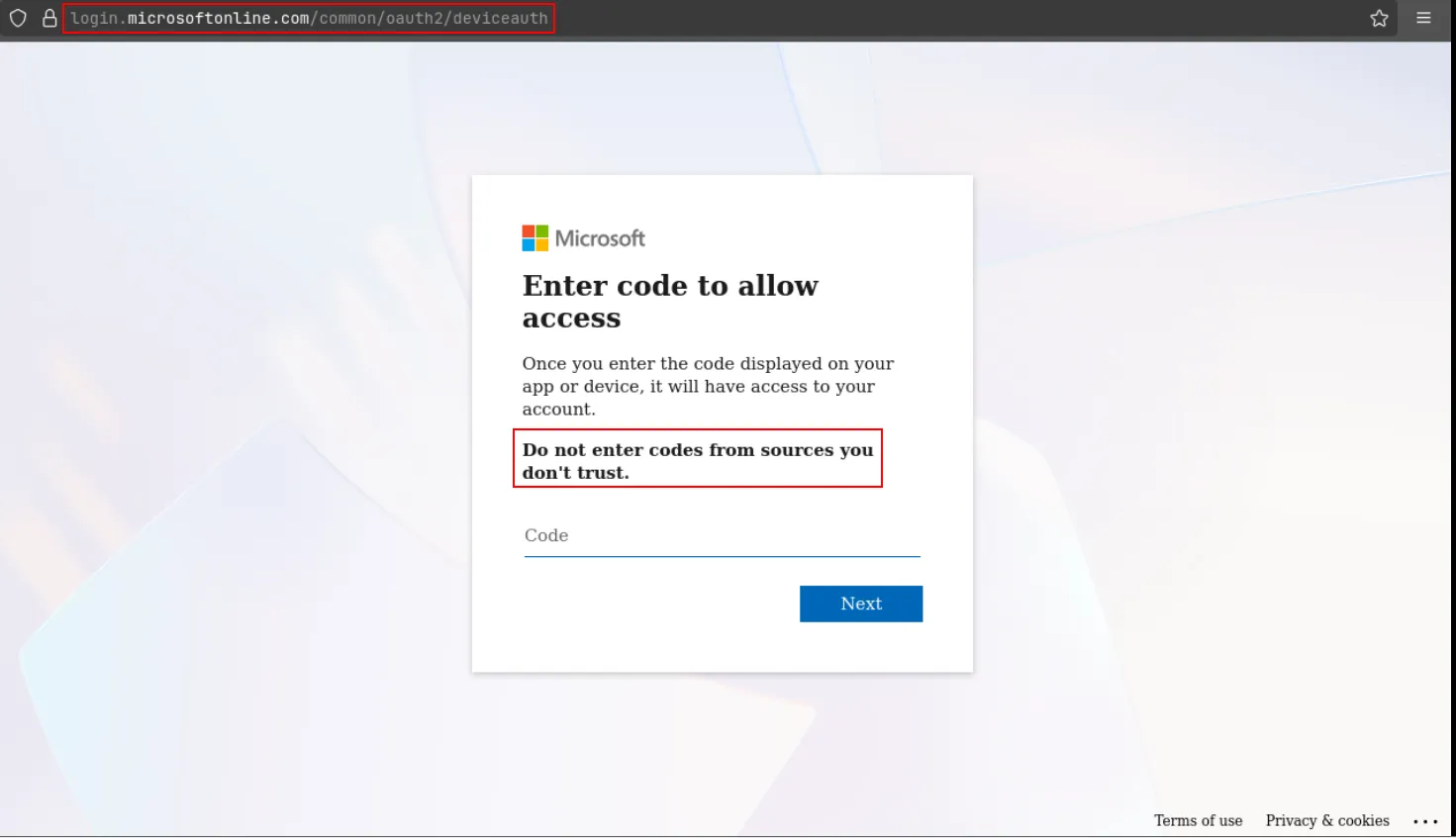
This is the real Microsoft page — note the genuine address login.microsoftonline.com/common/oauth2/deviceauth. Everything here is authentic, which is exactly why the attack works. Microsoft even tells you what’s happening: the heading is “Enter code to allow access,” and it warns, in bold, “Do not enter codes from sources you don’t trust” (highlighted). A shared document never needs any of this.
If the warning is ignored, you enter the code, sign in, and approve your MFA prompt — all completely normal. Microsoft, seeing a valid, MFA-approved login, issues the access and refresh tokens to the device that started the flow: the attacker’s server. In the background, that server has been polling for completion; the moment you finish, it has a working session as you.
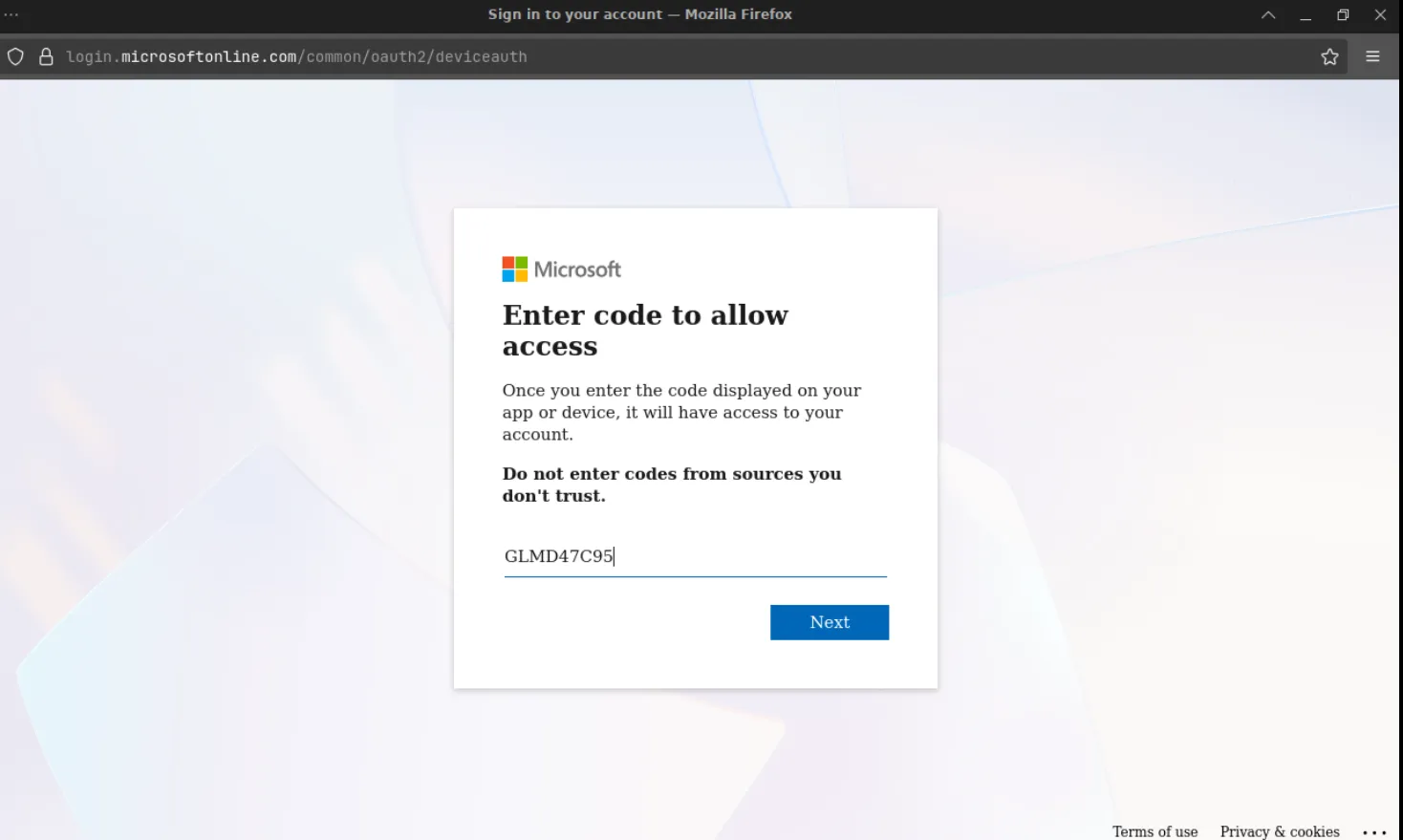
The trap closing. The very code shown on the fake OneDrive page in Stage 3 (GLMD47C95) is now typed into the genuine Microsoft device-login page. One click of Next plus a routine MFA approval, and Microsoft hands the resulting session to the attacker’s server — no password ever left the victim.
To avoid suspicion, the page then redirects you to a real document on a file-sharing service — so it feels like the “verification” worked and you simply opened the file.
During analysis, we confirmed the attacker’s server was live: a single request returned a real Microsoft device code with the genuine microsoft.com/device verification address and Microsoft’s exact 15-minute code lifetime. (The server also rejected a replayed request — it’s built with anti-abuse controls, a sign of a maintained kit.)
Why MFA doesn’t help here
This is the part that surprises people. MFA is designed to stop an attacker who has your password from logging in. But in this attack the attacker isn’t logging in with your password — you are, on the real site, and you pass your own MFA. MFA does its job perfectly and still the attacker wins, because the thing being approved is a session for their device, not a suspicious login from theirs. The defense is upstream: don’t enter codes you were handed.
Why our usual defenses didn’t catch it
| Control | Why it missed |
|---|---|
| Spam / link filters | The link lived on a real, hacked website and then bounced through a trusted news domain’s open redirect. |
| Fake-login detectors | There is no fake login form — the sign-in happens on the genuine Microsoft page. |
| MFA | The real user completes the real MFA, so the login is fully legitimate from Microsoft’s side. |
| Antivirus / EDR | Nothing is downloaded or executed on the endpoint; the theft is entirely a web/identity flow. |
| Sandboxes & analysts | A human-only CAPTCHA gate, IP-based researcher detection, in-browser encryption, and anti-debugging hide the payload. |
| User instinct | The lure imitates the everyday “open a shared document” flow on familiar Microsoft branding. |
How to defend — for everyone
The one rule that breaks the chain: Opening a shared document never requires you to copy a code and type it into a Microsoft sign-in screen. If any page or email hands you a code to “verify your identity” or “continue to Microsoft,” stop, close it, and report it.
Practical signals:
- 🚩 A document or web page that gives you a code and tells you to enter it at
microsoft.com/devicelogin(or any sign-in page). - 🚩 Being asked to approve or sign in to something you didn’t start.
- ✅ Safe: signing in to a service where you initiated the login, with no code presented to you.
- ✅ Safe: when in doubt, close the tab and confirm with the sender through a separate channel.
If you think you entered a code: contact IT/Security immediately. The fix is to revoke active sessions and refresh tokens, not just change a password — a stolen session can survive a password reset.
How to defend — for IT and security teams
- Block the OAuth device-code flow where it isn’t needed. In Microsoft Entra ID, a Conditional Access Authentication Flows policy can block device code flow for users/groups that have no legitimate need — this neutralizes the entire technique class. Allow it only for the specific device scenarios that require it.
- Hunt for device-code sign-ins. In Entra sign-in logs, filter for the device-code authentication protocol (
SigninLogs | where AuthenticationProtocol == "deviceCode") and review for unexpected users, IPs, geographies, or times. These are the high-signal events for this attack. - Respond to suspected compromise by revoking sessions/refresh tokens, then auditing for attacker persistence: new mailbox forwarding/inbox rules, granted OAuth app consents, newly registered MFA methods, and new app registrations.
- Block the indicators (URLs and the Cloudflare Workers hostname) at the proxy/EDR — but not the shared hosting/Cloudflare IPs, which serve countless legitimate sites.
- Report the infrastructure: the hosting provider (the compromised site), Cloudflare (the Workers harvester), the abused open-redirect site, and Microsoft.
Conclusion
Device-code phishing is a clean illustration of where attacker innovation has gone: away from breaking systems and toward borrowing legitimate ones — a hacked website you trust, an open redirect on a reputable domain, the real Microsoft login, and your own genuine MFA. Every individual component looks fine. The attack lives in the seam between them, in a single unusual request: “copy this code and enter it to continue.”
No mail filter, login detector, or second factor reliably catches that. A person who knows that a shared document never needs a sign-in code does. That makes this, more than most threats, a problem we solve with awareness — and one simple, memorable rule.
Appendix — Indicators of compromise (live attacker infrastructure)
⚠️ The indicators below were live malicious infrastructure at the time of writing. They are defanged (
hxxps://,[.]) so they can’t be clicked by accident — re-fang them before loading into blocklists or hunting tools, and never visit them from an unprotected browser.
Entry lure (compromised legitimate host):
hxxps://indecodesign[.]net/<target>/<name>opendocaccess.html          # the reported link
hxxps://indecodesign[.]net/accessportal/safe.html                            # same campaign
hxxps://indecodesign[.]net/<target>/<name>opendocaccess.html
hxxps://indecodesign[.]net/<target>/<name>.html
Open redirect abused for laundering (legitimate site, vulnerable endpoint):
hxxps://www[.]the********ker[.]com/articlesfront/banner_click?url=<destination>Stage-3 credential/token harvester (Cloudflare Workers):
hxxps://jzqs-udkz-yhxx[.]hutton-aasir-dropons-com-s-account[.]workers[.]dev/?email=<victim>
hutton-aasir-dropons-com-s-account[.]workers[.]dev    # the attacker's Cloudflare account subdomain (pivot)
Backend:  POST /api/session/init   ·   GET /api/session/status/<id>     # device-code broker
Header:   X-Antibot-Token: <64-char-token>
Decoy “success” redirect (legitimate file-sharing service):
hxxps://jumpshare[.]com/v/Y6VlDMJUIr7jJCSiE139Fingerprints:
Lure title:        "OneDrive - Shared Document"  (decoy file: Confidential_Memo.docx)
Filename pattern:  *opendocaccess.html
Genuine endpoint abused:  hxxps://microsoft[.]com/devicelogin
Session id format: dev_<epoch-millis>_<hex>
Hosting (shared — block the URLs and the workers[.]dev hostname, NOT these IPs):
192[.]185[.]48[.]147     # AS19871 Newfold/HostGator — indecodesign[.]net (shared, 40+ sites)
2a06:98c1:3120::8        # Cloudflare (Workers harvester)
Entra ID hunt:
SigninLogs | where AuthenticationProtocol == "deviceCode"A full IOC list and the captured (defanged) page samples accompany the companion ANALYSIS.md.